
How to Compare Supplier Quotations: Excel vs AI Scanning
A simple way for Saudi trading companies to compare supplier quotes: what to check beyond price, how to do it in Excel, and where AI scanning saves time.
By Morovix Team
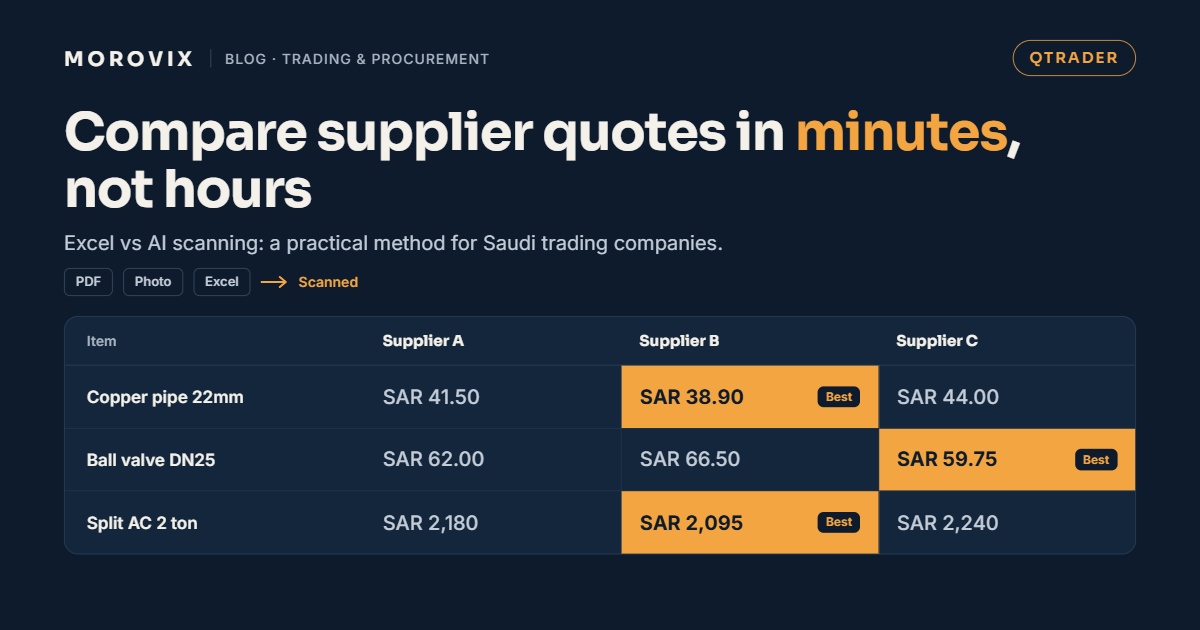
To compare supplier quotations properly, line up the same item, in the same unit, on the same terms, and compare the total cost to you, not just the unit price. Excel handles this well for a short RFQ with tidy quotes. Once quotes arrive as PDFs, photos and spreadsheets in different layouts, most of the time goes into typing, and that's where AI scanning saves the most.
QTRADER, Morovix's cloud ERP for trading companies, reads supplier quotes from PDFs and photos and puts them side by side for you. This guide covers what to compare, how to do it in Excel, and where each approach makes sense.
Why does comparing supplier quotes take so long?
The comparison itself is quick. Getting the quotes into a shape you can compare is what takes the time. A typical 40-line RFQ to three suppliers in Saudi Arabia comes back like this:
- One supplier sends a PDF, another a photo of a printed quote, the third an Excel file.
- Descriptions differ: one writes "Copper pipe 22mm", another "Cu tube 7/8 in", another uses Arabic.
- Units differ: per piece, per box of 10, per metre, per roll.
- One supplier skipped three lines; another offered a different brand.
- Some prices include VAT and some don't.
Before you can pick a winner, someone has to retype and normalise all of it. On a busy day, that's the step that delays your quotation to the customer.
What should you compare besides price?
The lowest unit price isn't always the cheapest option. Check these on every comparison:
| Factor | What to check |
|---|---|
| Item and specification | Same brand, model, size and standard, or an approved alternative |
| Unit and pack size | Convert everything to one unit before comparing |
| VAT | Compare all prices either including or excluding VAT, never mixed |
| Delivery | Delivery charges, and whether delivery is to your warehouse or the site |
| Lead time | A cheaper item that arrives after the customer's deadline costs you the deal |
| Payment terms | Cash in advance versus 30 or 60 days changes your cash flow |
| Validity | When the price expires, especially for copper, steel and imported items |
| Missing lines | A supplier who didn't quote some items may look cheaper than they are |
How to compare quotes in Excel
Excel works if you're disciplined about it:
- Start from your RFQ list, not the supplier's. Your item codes and descriptions are the rows.
- Add one column group per supplier: unit price, unit, converted price, lead time, notes.
- Convert every price to your unit, excluding VAT, in a separate column so the original stays visible.
- Mark missing lines clearly rather than leaving them blank, so they don't look like zero.
- Use a formula to flag the lowest converted price per line, then check the notes for lead time and brand.
- Total each supplier for the lines they actually quoted, and note the gap.
This is fine for ten lines and two suppliers. It breaks down when quotes are long, arrive as images, or change after negotiation, because every revision means retyping. The file also has no history: once someone overwrites a price, the original is gone.
How AI scanning changes the process
With AI scanning, the typing step disappears. The flow looks like this:
- Upload the supplier's quote as a PDF or a photo.
- The system extracts the items, quantities, prices and VAT.
- You review the result and match each line to your RFQ item.
- All supplier quotes appear side by side, and the best price per line is highlighted.
- You choose per line or per supplier, then build the customer quotation with your margin applied.
You still make the decision. The software removes the copying and keeps a record of every quote received.
Excel vs AI scanning
| Excel | AI scanning (QTRADER) | |
|---|---|---|
| Quotes as PDF or photo | Retyped by hand | Read automatically, then reviewed |
| Time to compare 3 quotes | Around 90 minutes* | Around 10 minutes* |
| Risk of typing errors | High on long RFQs | Low; you check extracted lines |
| Revisions after negotiation | Retype and overwrite | New version kept with history |
| Customer details sent to suppliers | Removed by hand | Hidden automatically on supplier RFQs |
| Link to quotation and PO | Copy and paste | Same data flows to quotation and purchase order |
*Typical estimates from the QTRADER brochure; actual results vary with the size and format of your quotes.
One supplier or split by line?
Picking the cheapest supplier for every line often saves less than it seems. Each extra supplier means another purchase order, another delivery, another invoice and another chance of a late item. A simple rule: split the order only when the saving on a line covers the extra delivery cost and admin, or when one supplier can't meet the lead time.
How QTRADER handles supplier quotes
- Supplier RFQs go out with your customer's details hidden.
- Smart document scanning reads supplier quotes from PDFs and photos into items, quantities, prices and VAT.
- Instant translation with translation memory handles mixed Arabic and English descriptions.
- Side-by-side comparison shows every supplier's price per line, with the best price picked out.
- Alternative items let you quote a different brand when the requested one isn't available.
- Margins are shown on the customer quotation before you send it.
- Purchase orders are created from the chosen supplier quote, ready for three-way matching when goods and the supplier bill arrive.
For the full RFQ-to-payment workflow, see our guide to RFQ management software in Saudi Arabia. Invoices at the end of that chain support ZATCA Phase 2; our Wave 25 checklist explains the deadline.
Frequently asked questions
What is a supplier quotation comparison? It's a side-by-side review of quotes from different suppliers for the same RFQ, comparing price, specification, terms and delivery so you can choose the best overall offer.
Should I compare prices with or without VAT? Either works, as long as every supplier is compared the same way. Mixing VAT-inclusive and exclusive prices is one of the most common comparison mistakes.
Is the lowest price always the best quote? No. Check lead time, payment terms, delivery charges, validity and missing lines. A cheaper quote that arrives late or leaves out items can cost more overall.
Can QTRADER read a supplier quote sent as a photo? Yes. QTRADER extracts items, quantities, prices and VAT from PDFs and photos of supplier quotes, and you review the result before saving.
Can suppliers see who my customer is? Not when you send supplier RFQs from QTRADER. Customer details are hidden on the RFQ that goes to suppliers.
Try it with your own quotes
Send us one RFQ and the supplier quotes you received for it, and we'll show you the comparison in QTRADER. Book a demo or message us on WhatsApp at +966 50 433 4135.
Ready to Transform Your Business?
Discover how AI, automation, and smart software solutions can improve your business operations.
Request a Free Initial Consultation